Elevate Your Desk with 3D Mouse Pad Sublimation PNGs
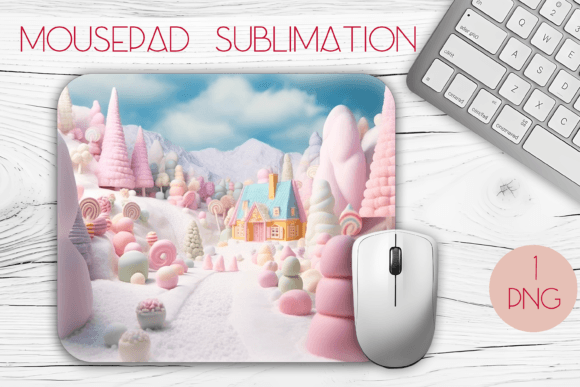
There is something incredibly satisfying about transforming a plain, functional item into a piece of art that reflects your personality or brand. For anyone involved in crafting, small business ownership, or simply looking to upgrade their workspace, the MousePad Sublimation 3d Design PNG offers a fantastic gateway into high-quality customization. Unlike standard flat graphics, these designs utilize depth, shadow, and perspective to create an illusion of three-dimensionality on a two-dimensional surface. When executed correctly through the sublimation process, the result is a mouse pad that looks textured and dynamic, even though it remains smooth to the touch.
The core appeal of using a dedicated 3d sublimation design for mouse pad lies in its visual impact. Standard printing often results in images that look slightly washed out or obviously "stuck on" top of the material. In contrast, sublimation infuses the ink directly into the polymer coating of the mouse pad. When you pair this technique with a design specifically engineered with 3D elements—such as realistic water droplets, popping text, or layered geometric shapes—the final product grabs attention immediately. It turns a mundane office accessory into a conversation starter or a powerful branding tool.
Understanding the Technical Specifications
Before diving into the creative possibilities, it is essential to understand what makes a digital file ready for production. Not all images are created equal, and the difference between a professional finish and a pixelated mess often comes down to resolution and format. A high-quality package typically includes a single PNG file that is optimized for specific dimensions. For instance, a file sized at 2850x2430 pixels with a density of 300 DPI (dots per inch) is the gold standard for this craft.
Why do these numbers matter? The 300 DPI ensures that when the image is printed, there are enough dots of ink per inch to create sharp lines and smooth color gradients without any visible jagged edges. The dimensions of 2850x2430 pixels are calculated to perfectly fit a mouse pad measuring approximately 9.5 x 8.1 inches. This aspect ratio is common for rectangular gaming mats or ergonomic desk pads. Using a file that matches your substrate size prevents unwanted stretching or cropping during the heat press stage. Furthermore, the PNG format is crucial because it supports transparency. This allows you to place your 3D design over different colored backgrounds or integrate it into larger composite layouts without a white box surrounding your artwork.
Ideal Applications for Creators and Entrepreneurs
The versatility of these designs extends far beyond personal use. For small business owners and entrepreneurs running print-on-demand shops or Etsy stores, offering products with unique 3D effects can significantly increase perceived value. Customers are often willing to pay a premium for items that look custom-made and visually striking. You might create a series of mouse pads featuring hyper-realistic nature scenes, abstract fluid art, or motivational quotes that appear to float above the surface.
Freelancers and marketers can also leverage these assets for corporate gifting. Imagine sending a client a branded mouse pad where their logo isn't just printed flat but appears to have depth and dimension. It adds a layer of sophistication to promotional materials that standard swag often lacks. Additionally, educators and bloggers who host workshops on digital crafting can use these files as teaching tools. They demonstrate how proper file preparation and the illusion of depth can elevate a simple sublimation project into something that looks professionally manufactured.
For the hobbyist or casual creator, the barrier to entry is low. Since you receive a ready-to-use high-resolution file, you skip the time-consuming process of designing complex shadows and highlights from scratch. You can focus entirely on the physical creation process: printing, pressing, and peeling. This makes it an excellent option for those who want to produce gifts for family members, such as a gamer-themed pad for a teenager or a floral design for a home office setup.
Practical Steps for Success
Using a MousePad Sublimation 3d Design PNG effectively requires more than just hitting the print button. To achieve the best results, consider the following workflow:
- Mirror Your Image: Sublimation transfers work in reverse. Always mirror your PNG horizontally before printing, or your text and directional elements will appear backward on the final product.
- Check Your Printer Profile: Ensure your printer settings are configured for sublimation paper and ink. Color accuracy is vital for 3D designs, as the shadows and highlights define the illusion of depth.
- Secure the Transfer: Use heat-resistant tape to firmly secure the printed design onto the mouse pad blank. Any movement during the press will cause ghosting, which ruins the crisp edges needed for the 3D effect to work.
- Time and Temperature: Follow the manufacturer's guidelines for your specific mouse pad blank. Generally, this involves high heat and moderate pressure for a specific duration. Over-pressing can scorch the design, while under-pressing leads to dull colors.
Important Considerations Before You Start
While the results can be stunning, there are a few things to keep in mind to ensure satisfaction. First, verify that your mouse pad blank has a polyester coating. Sublimation ink only bonds with polymers; it will not work on cotton, rubber, or uncoated surfaces. Second, be mindful of the color of your blank. Sublimation ink is translucent, meaning it dyes the fabric rather than sitting on top of it like a sticker. If you press a design onto a black mouse pad, the dark background will show through the lighter parts of your image. These 3D designs usually look best on white or very light-colored blanks to maintain the vibrancy and contrast of the shadows.
Finally, consider the lighting environment where the finished product will be used. The 3D illusion is often enhanced by ambient light reflecting off the smooth surface. Placing the mouse pad near a window or under a desk lamp can make the "popped" elements look even more realistic. Whether you are looking to expand your product line, create a unique gift, or simply enjoy the process of making something beautiful, starting with a high-quality, purpose-built design file sets the foundation for success. The combination of precise resolution, correct sizing, and artistic depth provides everything needed to turn a simple sheet of polymer into a standout piece of functional art.