Unlocking Professional Typography with the Angel 3D PSD Text Effect
In the fast-paced world of digital design, typography often serves as the primary vehicle for communication. Whether you are crafting a social media graphic, designing a YouTube thumbnail, or laying out a promotional banner, the style of your text can dictate the success of the visual message. For professionals and hobbyists alike, creating high-quality three-dimensional text from scratch in Adobe Photoshop can be a time-consuming process that requires a deep understanding of lighting, shading, and layer styles. This is where specialized assets like the Angel 3D PSD Text Effect become invaluable. Rather than building an effect layer by layer, this resource offers a pre-engineered solution that balances aesthetic appeal with functional flexibility.
The core value of the Angel editable text effect lies in its ability to democratize complex design techniques. It is not merely a static image but a fully functional template built on Photoshop's Smart Object technology. This distinction is crucial for anyone looking to maintain a professional workflow without getting bogged down in technical minutiae. By utilizing a system of well-organized layers and automated actions, the template allows users to swap out placeholder text with their own content in seconds. The result is a polished, three-dimensional typographic treatment that retains the integrity of the original design while adapting seamlessly to new copy.
The Mechanics of Smart Object Replacement
At the heart of this template's usability is the "Quick and easy Smart Object Replacement action." For those unfamiliar with the term, a Smart Object in Photoshop is a layer that preserves an image's source content with all its original characteristics. In the context of the Angel 3D PSD Text Effect, the creator has set up a specific workflow where the user simply double-clicks a designated layer icon, types their desired text in the new window, saves it, and watches the main document update automatically.
This mechanism eliminates the common pitfalls of manual editing, such as broken layer styles, misaligned shadows, or inconsistent bevels. When you manually adjust text effects, there is always a risk of altering the delicate balance of the lighting engine. With this template, the heavy lifting regarding blend modes, drop shadows, inner glows, and gradient overlays is already calculated and locked into the structure. The no skill requirement claim often associated with such tools holds true here because the complexity is abstracted away from the end-user. You do not need to know how to mask a highlight or paint a specular reflection; you only need to know how to type.
Customization and Structural Integrity
While ease of use is a significant factor, the true test of any design asset is its flexibility. A rigid template that looks good only with specific short words is of limited practical value. The Angel 3D PSD Text Effect addresses this by being 100% customizable and editable. The file structure is meticulously organized into folders, ensuring that every element—from the background texture to the foreground text and ambient lighting adjustments—is accessible.
This organization supports a non-destructive workflow. If a client requests a change in the color palette or a shift in the lighting direction, these adjustments can be made without degrading the image quality. Because the objects are vector-based or high-resolution raster smart objects, they are resizable with no quality loss. This scalability is essential for marketers and publishers who may need to deploy the same graphic across various platforms, from a small Instagram story to a large-format print billboard. The ability to scale without pixelation ensures that the investment in the template yields long-term utility across diverse projects.
Real-World Application and Performance
To understand the practical value of this asset, consider the workflow of a freelance graphic designer handling multiple clients. Time is billable, and efficiency directly impacts profitability. Using the Angel editable text effect, a designer can generate ten variations of a headline for A/B testing in the time it would traditionally take to render one custom 3D effect. The consistency provided by the template ensures that brand guidelines are met uniformly across all variations.
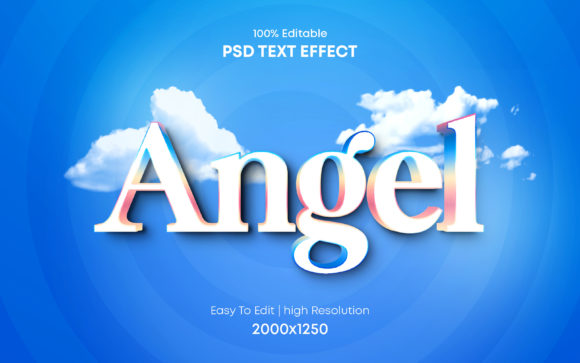
Similarly, for content creators and YouTubers, thumbnail readability is paramount. The high-contrast, dimensional nature of this specific text effect helps titles pop against busy backgrounds. The "Angel" styling typically implies a certain ethereal or polished metallic finish, which performs well in niches ranging from lifestyle vlogging to tech reviews. The included JPG preview files allow users to assess the look before committing to the PSD editing process, streamlining the selection phase of project planning.
The file type distribution is also worth noting. The package arrives as a .zip archive containing both the layered PSD and flattened JPG versions. This dual-format approach caters to different levels of technical comfort. Advanced users will dive straight into the PSD to tweak the Smart Objects, while those with minimal software access might use the JPG as a base for further composition in simpler editors, although the full potential is naturally realized within Photoshop.
Who Benefits Most from This Template?
The audience for the Angel 3D PSD Text Effect is broad, spanning adults aged 20 to 50 who engage in visual content creation. Specifically, the following groups stand to gain the most:
- Small Business Owners: Individuals managing their own marketing often lack the budget for a dedicated design team. This tool empowers them to create professional-grade ads and social posts independently.
- Digital Marketers: Professionals running ad campaigns need rapid iteration. The ability to swap text quickly allows for agile responses to market trends.
- Educators and Publishers: Creating engaging headers for course materials or eBooks becomes significantly faster, allowing more focus on the educational content itself.
- Serious Hobbyists: Photographers or artists looking to add sophisticated typography to their portfolios can achieve a high-end look without mastering 3D modeling software.
Evaluating Quality and Long-Term Value
When assessing the quality of a design template, one must look beyond the initial visual impact. The longevity of the asset depends on its adaptability. The Angel 3D PSD Text Effect scores highly in this regard due to its clean layer hierarchy. A messy file with unnamed layers ("Layer 1 copy 4") is a frustration that slows down production. In contrast, a well-organized folder structure indicates a professional standard of development, making it easier to troubleshoot if issues arise.
Furthermore, the uniqueness of the design prevents the "template look" that plagues many stock resources. While the underlying mechanics are standardized for ease of use, the specific aesthetic of the Angel effect offers a distinct character. It avoids the generic plastic look of default 3D presets, offering instead a refined finish that suggests a higher production value. This contributes to the perceived credibility of the brands or individuals using it.
However, it is important to maintain realistic expectations. While the template is powerful, it is bound by the capabilities of 2D simulation within Photoshop. It is not a substitute for true 3D rendering software like Blender or Cinema 4D when complex camera movements or physics-based interactions are required. For static images and simple animations, however, it provides a near-indistinguishable alternative at a fraction of the learning curve.
Final Recommendations for Integration
Integrating the Angel 3D PSD Text Effect into your workflow should be viewed as a strategic move toward efficiency. It is best utilized when consistency and speed are priorities. Before beginning a project, ensure you have the necessary version of Adobe Photoshop to support the Smart Object features, as older versions may not interpret the layers correctly.
For optimal results, experiment with the color adjustment layers included in the pack. While the default settings are curated for visual harmony, shifting the hue or saturation can align the text effect more closely with specific brand colors. Additionally, pay attention to the resolution of your source text; since the effect relies on the shape of the letters, extremely thin fonts may not capture the 3D beveling as effectively as bolder typefaces.
In conclusion, the Angel 3D PSD Text Effect represents a convergence of artistic design and technical utility. It removes the barrier to entry for creating stunning 3D typography while providing the depth of control that professionals demand. By leveraging its smart object architecture and organized structure, creators can elevate their visual output, save valuable production time, and maintain a high standard of quality across all their digital communications. Whether you are a seasoned designer looking to streamline your process or an entrepreneur aiming to polish your brand image, this template offers a reliable and effective solution for modern typographic challenges.