Unlocking Creative Potential: A Guide to the 3D Pink Style Text Effect
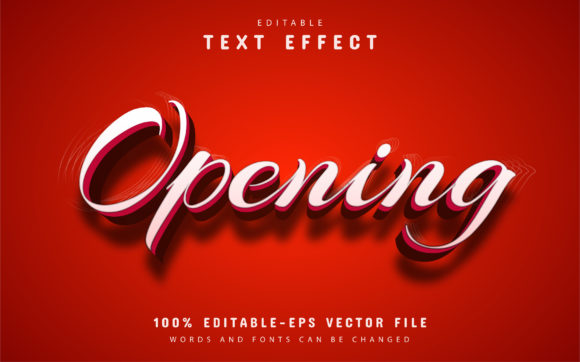
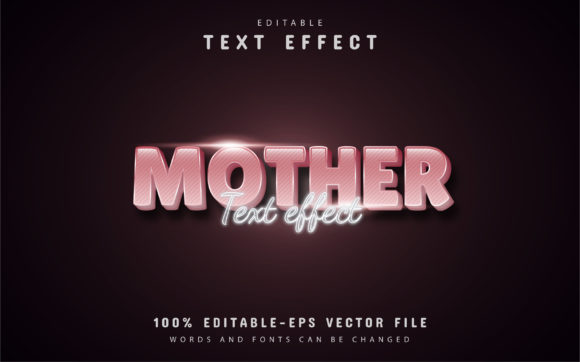
In the vibrant world of digital design, first impressions are everything. Whether you are crafting a logo for a new boutique, designing a thumbnail for a lifestyle vlog, or creating promotional material for a spring sale, the typography you choose sets the tone for your entire project. Among the myriad of styles available today, the 3D Pink Style Text Effect has emerged as a standout choice for creators looking to inject energy, modernity, and a touch of playful sophistication into their work. This article explores what makes this specific design trend so significant, how it functions technically, and why utilizing fully editable vector resources can revolutionize your workflow.
The Psychology and Appeal of 3D Pink Typography
Color and dimension are powerful tools in visual communication. The color pink, often associated with creativity, warmth, and approachability, has evolved far beyond its traditional stereotypes. In modern branding and digital art, shades ranging from soft pastel blush to electric magenta are used to convey innovation and friendliness. When you combine this versatile color palette with a three-dimensional effect, the result is text that literally pops off the screen.
The "3D" aspect adds depth and realism, making the text feel tangible. This is particularly effective in an era where flat design has dominated for years; adding dimension creates a fresh contrast that grabs the viewer's attention. For businesses in the beauty, fashion, confectionery, or tech sectors, a 3D pink text effect can signal that a brand is both trendy and substantial. It bridges the gap between professional polish and creative flair, making it an excellent choice for projects that need to stand out in crowded social media feeds or on bustling retail shelves.
Why Vector Quality Matters in Modern Design
One of the most critical aspects of working with text effects like the 3D Pink Style is understanding the underlying file format. The resource described here is not merely a static image; it is a fully editable vector design. But what does that mean for you, the creator?
Unlike raster images (such as standard JPEGs or PNGs), which are made of pixels and lose quality when enlarged, vector files are built on mathematical paths. This means you can enlarge or reduce the size of your text to fit a billboard or a business card without any loss in clarity. The quality has never decreased, regardless of the scale. This scalability is essential for professional applications where a design might need to be repurposed across various mediums—from a tiny favicon on a website to a large-format print banner.
Furthermore, because this design is provided in EPS format alongside JPG previews, it ensures compatibility with industry-standard software like Adobe Illustrator. This flexibility allows designers of all skill levels to maintain high production values without needing to recreate complex lighting and shading effects from scratch.
Practical Applications Across Industries
The versatility of the 3D Pink Style Text Effect makes it relevant across a wide spectrum of industries and daily activities. Here is how different sectors can leverage this tool:
- Retail and E-Commerce: Online stores selling cosmetics, sweets, or children's products can use this effect for sale banners. The 3D depth draws the eye to discount percentages or new arrival announcements.
- Social Media Influencers: Content creators on platforms like Instagram and TikTok require thumbnails and story headers that stop the scroll. A vibrant, dimensional pink text overlay can significantly increase click-through rates.
- Event Planning: From baby showers to bridal parties and birthday celebrations, invitations and digital save-the-dates benefit from the celebratory nature of this style.
- Educational Materials: Even in education, engaging visuals are key. Teachers creating materials for younger students can use friendly, colorful 3D text to make learning modules more inviting.
By using a pre-made template, professionals in these fields save hours of rendering time. Instead of struggling with complex lighting settings in 3D software, they can focus on the message and the overall layout of their project.
Demystifying the Editing Process
A common misunderstanding among beginners is that high-quality 3D text effects require advanced technical skills or expensive 3D modeling software. However, with modern vector templates, the barrier to entry is incredibly low. The design featured here boasts unlimited color variations and is easy to edit, requiring no prior expert knowledge.
The process is streamlined to ensure that anyone with access to Adobe Illustrator can achieve professional results. The template is designed with the user in mind, separating the text layer from the effects layer intelligently. This separation allows you to change the wording without breaking the 3D illusion or the lighting consistency.
Consider a scenario where a bakery wants to announce a "Strawberry Special." Using a static image would require a designer to manually redraw the text. With this editable vector file, the bakery owner or their marketing assistant can simply type in the new words, and the 3D pink effect automatically wraps around the new letters, maintaining the perfect curvature and shadowing.
Step-by-Step: How to Customize Your Text
To help you get started immediately, here is a straightforward guide on how to manipulate this design file. The process is intuitive and follows standard workflows within Adobe Illustrator.
- Open the File: Launch Adobe Illustrator CS or any higher version. Navigate to your downloaded folder and open the EPS file. This ensures all vector data is preserved.
- Select the Type Tool: Once the file is open, press the "T" key on your keyboard to activate the Type Tool. Alternatively, you can select the icon resembling a "T" from the toolbar on the left side of the screen.
- Edit the Content: Click directly on the existing text within the design. You will see the cursor appear, allowing you to delete the placeholder text and type your own message. Whether you need a single word or a short phrase, the font will adjust accordingly.
- Customize Colors: If the specific shade of pink doesn't match your brand guidelines, you can easily alter it. Select the text object and use the Color Picker or Swatches panel to apply unlimited color variations. The gradient and shading maps within the vector file will adapt to your new color choice seamlessly.
- Export for Use: Once satisfied, go to File > Export. You can save your creation as a high-resolution JPG for web use or keep it as a PDF/EPS for print purposes.
This simplicity underscores the value of the resource. It empowers users to iterate quickly. If you are testing different headlines for an ad campaign, you can generate ten variations in the time it would normally take to create one from scratch.
Maximizing Value with Downloadable Resources
When you download this package, you aren't just getting a picture; you are acquiring a comprehensive toolkit. The download content typically includes:
- JPG Files: High-quality preview images for immediate use in mockups or presentations.
- EPS Files: The core vector source files that allow for infinite scaling and editing.
- Font Information: Details on the specific typeface used, often linking to free fonts so you can install them on your system for consistent rendering.
Having access to the font info is crucial. Sometimes, if a specific font isn't installed on your computer, the software may substitute it with a default font, ruining the aesthetic. By providing clear font information, the creator ensures that the final output looks exactly as intended.
Conclusion: Elevating Your Design Game
The 3D Pink Style Text Effect represents more than just a fleeting design trend; it is a practical solution for modern communicators who need to balance speed with quality. In a digital landscape saturated with content, the ability to produce eye-catching, dimensional typography can be the difference between being ignored and being noticed.
By leveraging fully editable vector designs, you remove the technical hurdles of 3D rendering while retaining full creative control. Whether you are a seasoned graphic designer looking to speed up your workflow or a small business owner handling your own marketing, these tools provide the foundation for professional-grade results. Embrace the power of scalable vectors, experiment with vibrant colors, and let your text tell your story with depth and style.